
Barcode inventory software: what to look at before you buy
Key takeaways
- A barcode scanner removes typing errors, but it does not balance inventory on its own: that depends on the software that receives the code.
- The software should deduct stock when you sell, track each warehouse, alert on minimum stock, keep a trail of every movement and allow custom product fields.
- For most SMEs a basic USB scanner is enough; the difference is in the system behind it.
- In the IAnalitics SaaS Platform the sales form has a built-in scanner and deducts inventory on confirmation; the Free Core plan lets you try it free with up to 3 users.
You close the month, reconcile inventory in a spreadsheet, and the numbers do not add up. Someone typed 15 instead of 51, someone else sold a product and forgot to deduct it, and a third person is counting physical boxes while the system says something different. That gap does not show up on an ordinary day: it shows up the day a customer asks for 20 units of something that exists on paper but not in the warehouse.
A barcode scanner does not fix that on its own. It fixes half of it, which is the typing. The other half depends on what software sits behind the scanner, and that is where it pays to look carefully before buying the first device you find online.
What a barcode solves and what it does not
Typing a code by hand has two problems: it is slow, and it is where people make the most mistakes. A product with the reference "REF-2024-0158" can be mistyped in several ways, and every error ends up as an inventory movement that corresponds to nothing real.
A scanner solves exactly that: you point, it beeps, and the code is recorded exactly as printed, without anyone transcribing it. That alone removes a good share of typing errors in a sale or a goods receipt.
What a scanner does not solve is what happens after the code is read. If the system does not deduct inventory at that moment, if it does not distinguish between warehouses, or if the stock report takes a day to update, the barcode has only moved the problem somewhere else: now you read fast, but the inventory is just as out of date.
Types of scanner, briefly
There is no need to go deep here, but it helps to know the options before buying:
- USB or Bluetooth laser or camera scanners: the most common at the counter. They connect to a computer or tablet and behave like a keyboard: wherever the cursor is, that is where the code is typed.
- Phone camera: several apps turn the camera into a scanner. Useful for starting without buying hardware, though slower than a dedicated scanner at a busy counter.
- Wireless warehouse guns: built for physical stock counts, walking between shelves, not for the sales counter.
For most small and medium businesses, a basic USB scanner is enough. The real difference is not in the scanner: it is in the software that receives the code.
What the software behind the scanner should do
Before buying an inventory system with barcode support, this is what is worth verifying:
- Automatic deduction on sale. That scanning the code during a sale subtracts that unit from inventory right then, not at the end of the day or through a manual sync.
- Per-warehouse control. If the business has more than one location, the system should know which warehouse each unit is in, not just the overall total.
- Minimum stock alerts. Warning you before you run out of a product, not after.
- Movement traceability. Being able to see who sold, bought or moved each unit, and when, for the times something does not add up.
- Custom fields per product. Beyond the code and the price, every business needs to record different things: size, colour, manufacturer, expiry date.
A scanner wired to a spreadsheet solves the typing. A scanner wired to a system covering these five points solves the inventory.
How it works in the IAnalitics SaaS Platform
The inventory module centralises products, suppliers, requisitions and movements per warehouse, with code, stock, costs, minimums and maximums, manufacturer, and up to 10 custom fields per product. Low and out-of-stock alerts are automatic and visual.
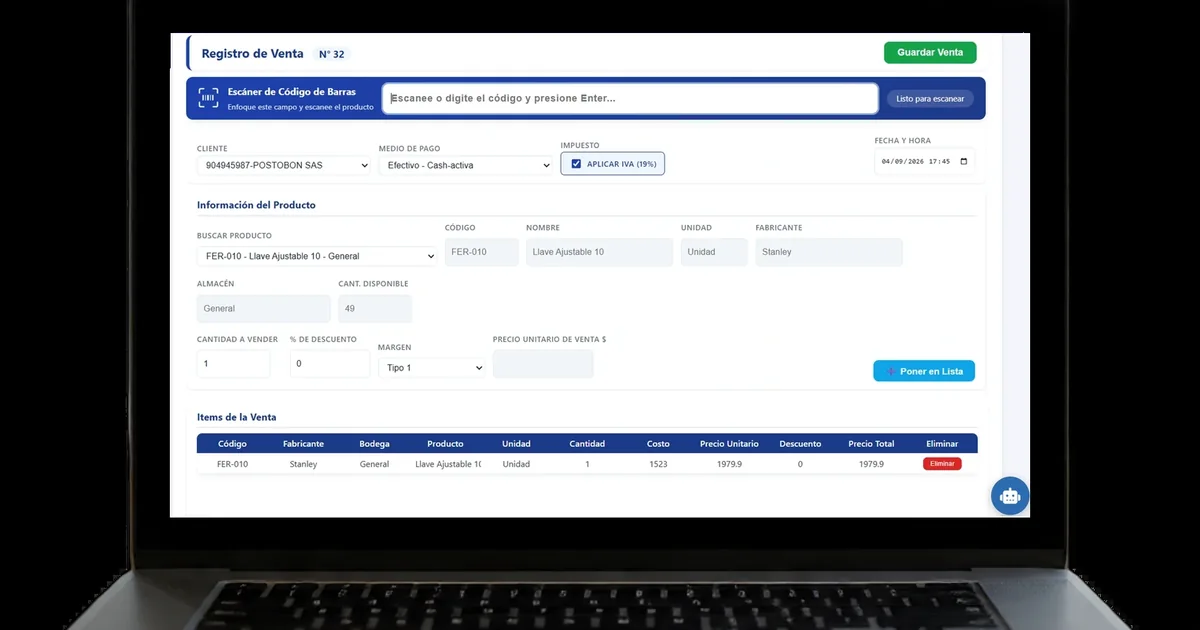
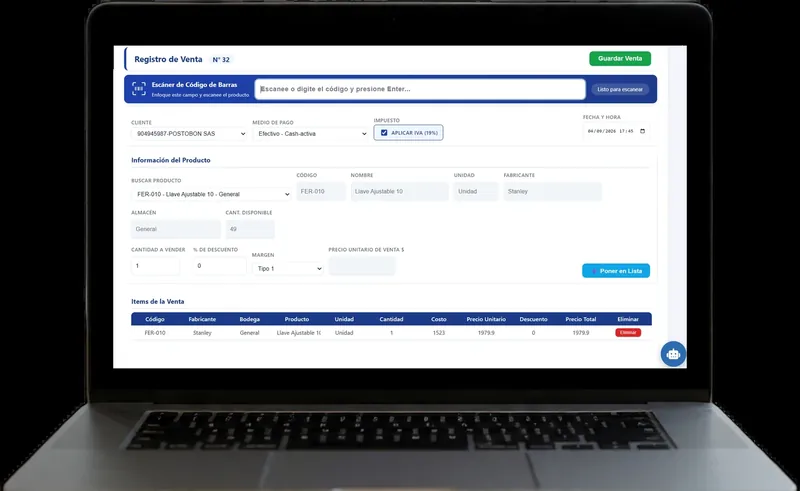
The new sale form includes a barcode reader: you connect the scanner, point at the product, and the sale line is added without typing it. When the sale is confirmed, inventory is deducted automatically, using the margins you already configured, whether a single margin, one by cost range or one specific to the product.
Inbound and outbound movements carry full traceability, so if something does not add up at month end, the history says exactly what happened to that unit and who moved it. That is what really saves time: not reconciling inventory from memory, but looking it up.
If you want to see it screen by screen before trying it, there are manuals for Inventory, Inventory movements and Sales and cash, with real screenshots of the platform (in Spanish).
When it is worth it and when a standalone scanner will do
If you sell few product lines and keep track in your head, a scanner wired to any spreadsheet is probably enough for now. The point where it starts to hurt is when the catalogue grows, more than one person is selling, or the business has more than one warehouse: that is where the spreadsheet stops being enough and the gap between what the paper says and what is on the shelf becomes expensive.
You do not need to start with the most complete plan either. The Free Core plan from IANALITICS includes the inventory and sales modules for up to 3 users, so you can try the full barcode flow before paying anything.
Want to see the scanner working in a real sale?
We will show you the sales form, how a scanner connects and how inventory deduction looks when the transaction is confirmed.
Book a demo Or create your free accountFound this useful? Every week we share guides like this one on LinkedIn. Follow IANALITICS on LinkedIn →