
E-invoicing in Colombia: what you need before issuing your first invoice

Key takeaways
- What delays your first invoice is not the software but the paperwork: a RUT with responsibility 52, DIAN enablement with its test set, an authorized numbering range and a digital signature.
- An electronic invoice is an XML file that DIAN validates before it reaches your customer; it is identified by its CUFE and, once validated, can only be corrected with a credit note.
- There are three ways to issue: DIAN's free solution (for few invoices), a technology provider, or your own software, developed in-house or bought from a software manufacturer.
- With IANALITICS your company enables the platform as its own software: it signs with its own certificate and the platform transmits directly to DIAN, on the Advanced and Performance plans.
Almost everyone starts with the wrong question: which software to buy. The software is the easy part. What really holds up your first invoice is the paperwork that comes before it, and it pays to be clear on that from the start.
This guide is for small business owners, accountants and admin staff who have to get e-invoicing up and running. It does not replace your accountant, but it will help you walk into that conversation with the right questions.
What an electronic invoice actually is
It is an XML file with a structure defined by the DIAN, Colombia's tax authority. Before it reaches your customer, the DIAN validates it. If it passes, it gets a unique identifying code called the CUFE. The PDF you see and send to your customer is only the visual representation of that file: legally, the invoice is the XML.
That has a consequence that catches many people off guard. A validated invoice cannot be deleted or edited. If there was a mistake, you correct it with a credit note that references the original.
What you need to have ready
The short list, roughly in the order it usually happens:
- An up-to-date RUT. The responsibilities box has to show code 52, electronic invoicer. Without it, everything else stalls.
- Enabling on the DIAN portal. You register as an electronic invoicer, state what you will issue with, and pass a test set: a batch of trial documents the DIAN has to accept before letting you invoice for real.
- Authorised numbering. A prefix and a range of consecutive numbers, with an expiry date. Every invoice has to fall inside that range.
- A digital signature. Every document is signed with a digital signature certificate. With your own software, the signature is your company's, with its own certificate; with a technology provider, it depends on the contract. Ask before you choose, because it changes what you will pay.
Three ways to issue
| Route | Who it makes sense for | What to keep in mind |
|---|---|---|
| The DIAN's free tool | Businesses issuing few invoices | You fill in one invoice at a time and it does not connect to your inventory or your sales |
| Your own software, developed in-house or bought from a software manufacturer | Companies that want to invoice from the same system where they sell and manage inventory | The company enables itself, signs with its own certificate and transmits directly. If it builds the software itself, it has to keep it current with every technical change the DIAN publishes; if it buys it, that is the manufacturer's job |
| A technology provider, directly or through software that works with one | Companies that prefer to hand transmission over to a third party | You pay for the service and transmission is the provider's responsibility. Check they are on the DIAN's list |
If you issue ten invoices a month and do not manage inventory, the free tool is probably enough, and there is no point paying for anything else. The calculation changes when invoicing is the last step of something bigger: a sale that draws down inventory, an order that came from a purchase request, a customer you sell to on credit. At that point, filling in each invoice by hand means retyping data that already existed somewhere else.
The mistakes you have to undo later
Expired or exhausted numbering. Authorised numbering has an expiry date and a ceiling. Once you pass either, whatever you issue is rejected. Set a reminder well ahead, because this is usually discovered the day an invoice will not go out.
VAT set up wrong on the product. Exempt and excluded are not the same thing, even though both end up as zero on the invoice. If the product was configured wrong, the error repeats on every sale until someone notices.
Incomplete or outdated customer data. A tax ID with one digit off, or an email address nobody checks any more. In the first case you need a credit note and a new invoice. In the second, the invoice is fine, but your customer never saw it.
Trying to delete an invoice. We said it above, but it is the most common stumble when starting out. A validated invoice stays; you correct it with a credit note.
Invoicing "when there is time". The invoice is issued with the sale, not at month end when someone sits down to catch up. Doing it late exposes you to penalties, which are settled in UVT and change every year.
How we handle it at IANALITICS
With IANALITICS your company enables itself with the DIAN using its own software. We are the software manufacturer; the one that enables itself, signs with its certificate and invoices is your company. We put it exactly that way because the market tends to blur it: IANALITICS is not a technology provider and does not issue on behalf of its customers.
We guide you through the enablement. Your company registers the software on the DIAN portal with its own user, loads its digital signature certificate into the platform, and the platform generates and sends the test set. Invoices, POS receipts, payroll and supporting documents are each enabled separately.
A new invoice pulls in the customer with their tax ID, email and address, the products, the payment method and type (cash or credit) and, where applicable, the customer's purchase order. The platform signs it with your company's certificate and transmits it directly to the DIAN. Credit notes, supporting documents and e-payroll are all handled from the same Accounting module.
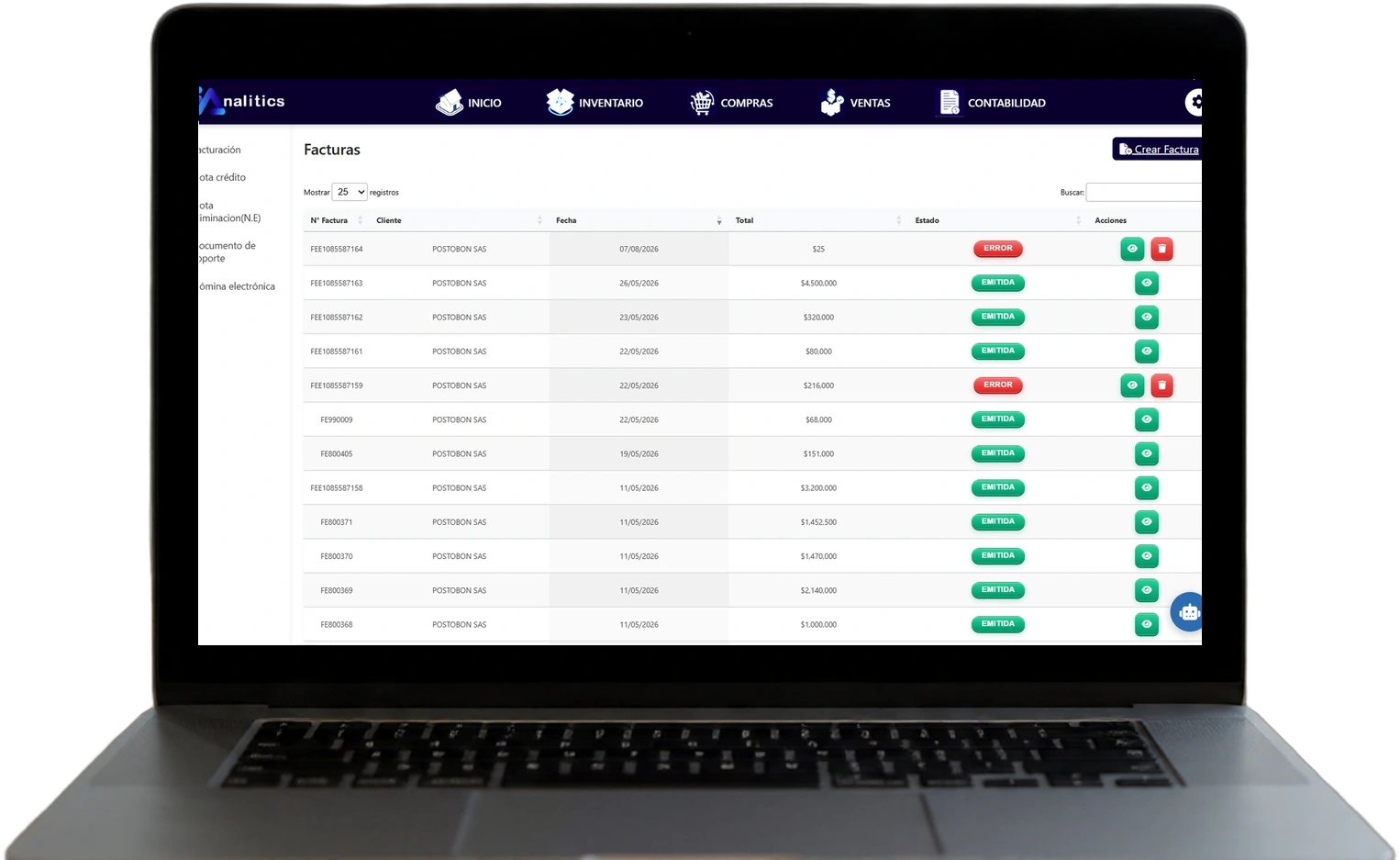
The detail we care about most is the status column. Each invoice shows whether it was issued or came back with an error, and only the ones that were not issued or came back with an error can be deleted, corrected and issued again. Issued invoices have no delete button. It is the DIAN's own rule, put on screen so nobody has to remember it.
E-invoicing is included in the Advanced and Performance plans. What each one covers is on the pricing page.
The step-by-step enablement guide, with screenshots of every screen, is in the DIAN e-invoicing manual; the sales invoice and its accounting entry are in the Accounting manual (both in Spanish).
Want to see it with a case like yours?
In a demo we walk through the full flow, from sale to issued invoice, and answer the questions specific to your operation.
Book a demo Or create your free accountThis article is informational and does not constitute tax advice. E-invoicing rules change frequently: confirm the current requirements with your accountant or directly at dian.gov.co.
Found this useful? Every week we share guides like this one on LinkedIn. Follow IANALITICS on LinkedIn →