
Integrated accounting: from invoice to financial statements without the month-end spreadsheet
Key takeaways
- In the IAnalitics SaaS Platform, accounting is built from the documents operations already record: whoever invoices or pays needs no chart of accounts, and the accountant goes from retyping to reviewing.
- Three document types post automatically: sales invoices (FE), petty cash expenses (E) and received invoices or bills (C, plus E if already paid). Everything else goes in with a manual voucher.
- Posted entries are never deleted: they are reopened with a reason, leaving a record of who did it and when.
- It includes the journal and ledger, income statement, statement of financial position and bank reconciliation; the year-end close and accounting judgment stay with the accountant.
In many small companies the month-end close starts the same way. Someone builds a spreadsheet with the purchase invoices, the petty cash receipts and the sales, sends it to the accountant, and she retypes all of it into her accounting software. Every figure is written twice, by two different people, and the discrepancies surface once the month has already closed.
The Accounting module of the IAnalitics SaaS Platform starts from a different idea: whoever runs the business records their documents where they already recorded them, and the accounting is built from those. The person invoicing or paying an expense does not need to know the chart of accounts. The accountant stops transcribing and starts reviewing.
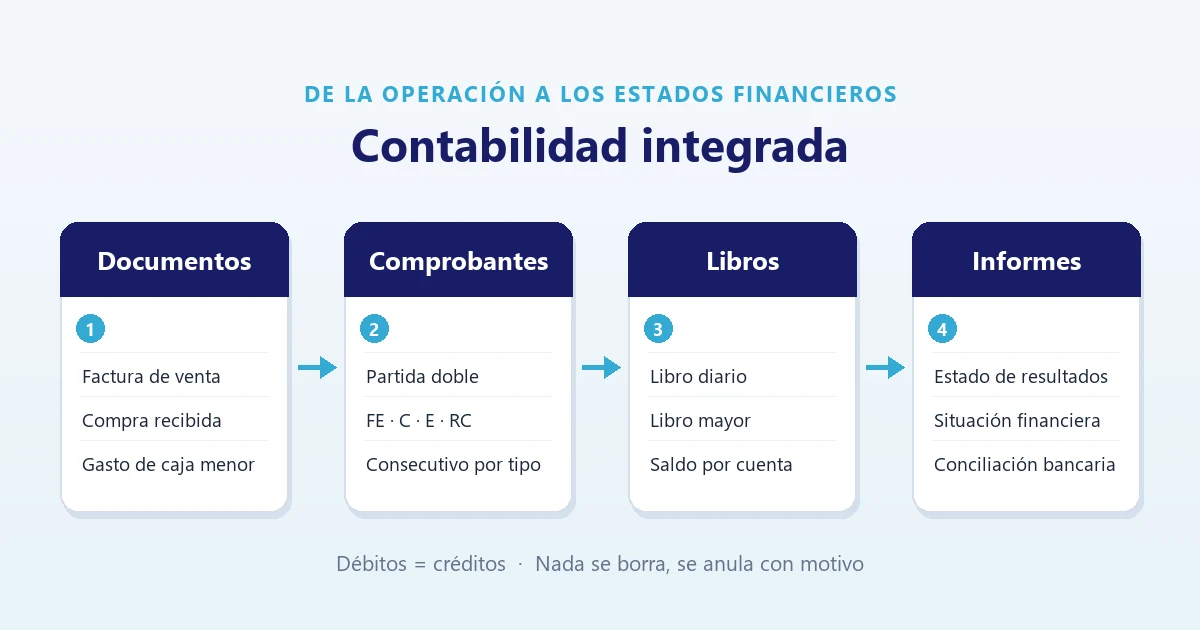
The path of a document
- Documents. A sales invoice, a petty cash expense, a supplier invoice or bill received, or a manual voucher.
- Vouchers. Each document becomes a double-entry posting. Each type carries its own continuous sequence: FE for sales, C for accruals, E for disbursements, RC for cash receipts.
- Books. The journal shows every accounting line; the general ledger, the balance of each account.
- Reports. Income statement, statement of financial position and bank reconciliation.
Books and statements are consulted by month. What decides which month a movement falls into is the document date, not the day someone typed it in.
What is posted automatically and what is not
It is the first question any accountant asks, and it is better known upfront than discovered at close. The system generates postings automatically for three types of document:
| Economic event | Where it is recorded | Voucher |
|---|---|---|
| Invoiced sale | Invoicing → New invoice | FE |
| Expense paid from petty cash | Sales → Expenses | E |
| Supplier invoice or bill received | Purchases and expenses | C, plus E if already paid |
Everything else is entered with a manual voucher in the journal: collection of invoices (cash receipt), cost of sales, payroll with its social security and benefits, sales credit notes, depreciation, bank charges and financial transaction tax, and tax settlements. E-payroll, for instance, is transmitted to the DIAN from the same module, but its posting is recorded by the accountant.
One detail worth keeping in mind: point-of-sale transactions move the cash balance, but the revenue reaches the accounts when that sale is invoiced.
The purchase: the document that replaces the spreadsheet
In Purchases and expenses, each invoice or bill received is recorded once, with everything needed to post it: document type and number, issue date, supplier, base amount, VAT at 0, 5 or 19%, withholding tax, local business tax withholding and VAT withholding, and the supporting PDF or image. If it has already been paid, you state the date and the account the money came from.
The key is the expense category. Each category stores which accounts the expense goes to and how it is split between administration, sales and production. Whoever records it only picks the category; the accounting judgement was configured beforehand by the accountant.
This is how a $500,000 invoice plus VAT, with $20,000 withholding tax, split 70% to administration and 30% to sales, ends up:
| Account | Debit | Credit |
|---|---|---|
| Administrative expense (51xx), 70% | 350,000 | |
| Selling expense (52xx), 30% | 150,000 | |
| Recoverable VAT | 95,000 | |
| Withholdings applied | 20,000 | |
| Accounts payable | 575,000 | |
| Totals | 595,000 | 595,000 |
Withholdings do not reduce the document total: they reduce what is paid to the supplier. If the purchase was already paid, the system also generates the disbursement that settles the $575,000 against the bank or cash. The account codes in the example are illustrative; each company uses those of its own chart of accounts.
Nothing is deleted: it is voided with a reason
- Double entry enforced. The system will not save a voucher where debits do not equal credits.
- One document, one posting. Pressing Post several times only processes what is pending; no document is posted twice.
- Posted items are locked. A purchase already posted cannot be edited. To correct it you use Reopen for correction, which asks for a reason and voids the vouchers, leaving a record of who did it and when.
- Separate permissions. Someone who only records documents can have view and create rights; voiding and reopening require the delete permission, which normally stays with the accountant.
Books, statements and reconciliation
The general ledger groups by four-digit account and checks at the foot that debits equal credits and that the sum of balances is zero. The income statement is cumulative from 1 January to the chosen month. The statement of financial position accumulates from the start of the accounting records and verifies that assets equal liabilities plus equity. Each book and statement prints with the company header, the tax ID, the period and, on the statements, signature spaces for the legal representative and the accountant.
Bank reconciliation imports the bank statement in Excel or CSV and matches it against the accounting for that account: it pairs movements with the same amount and up to five days' difference in date. What is left over appears in two lists — what is in the bank but not recorded (bank charges, financial transaction tax, interest) and what is in the books but not in the bank (uncashed cheques, transfers in transit, or a mistaken entry). Reconciliation does not create postings: it flags what is missing, and what is missing is recorded with a manual voucher.
What remains the accountant's work
The module does not replace accounting judgement; it removes the transcription. Still in her hands are the initial configuration (the chart of accounts over the Colombian PUC, the ordinary or simplified tax regime, and which account corresponds to each concept), the month's manual vouchers, and the year-end close: the system does not transfer the prior year's profit to equity on its own, and until that voucher is made, the balance sheet shows it as a difference.
That is why it makes most sense for companies that already invoice, purchase and handle cash inside the platform: there the accounting comes out of data that already exists. If your company does not operate on the platform and only needs books kept, the saving is much smaller.
The full step by step, with every screen, sample postings and system messages, is in the Accounting module manual.
Want to see it with a real month-end close?
We will show you how an invoice, a purchase and a cash expense reach the general ledger and the financial statements, and what your accountant would review.
Book a demo Or create your free accountThis article describes how the software works and does not constitute accounting or tax advice. The accounts and treatments for each company are defined by its accountant.
Found this useful? Every week we share guides like this one on LinkedIn. Follow IANALITICS on LinkedIn →