
Inventory control in Excel: how far it goes and when to switch to software
In short
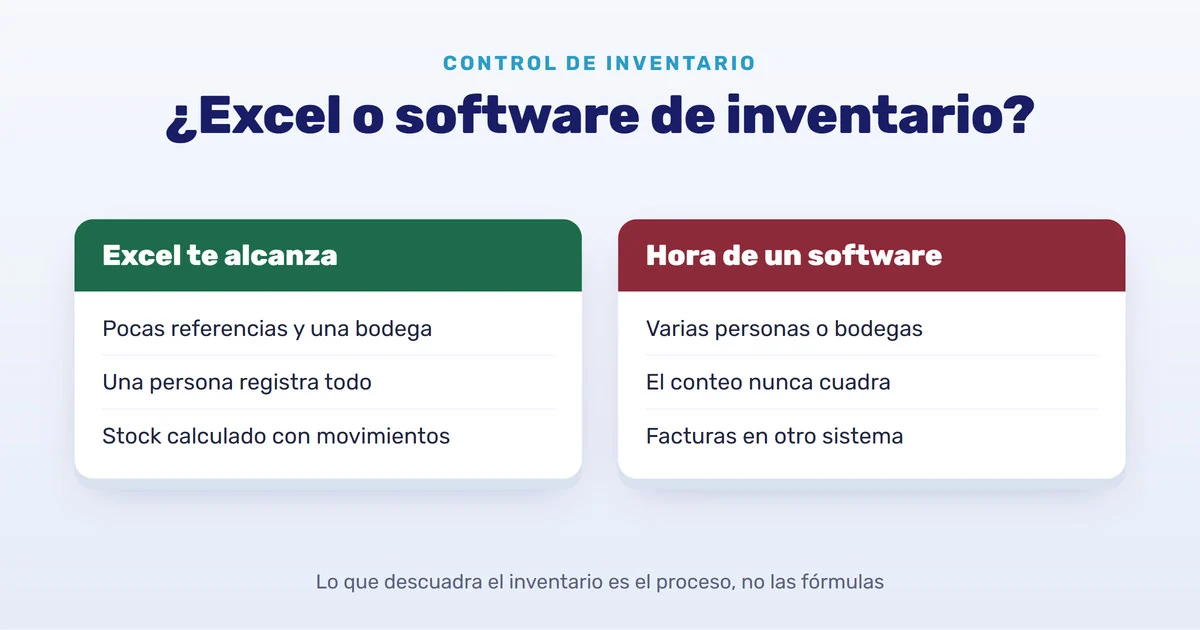
- Excel works to get started if you have few products, a single warehouse and one person who updates it every day.
- The key is not to type the stock by hand: record every receipt and issue in a movements sheet and let a formula calculate the balance. In practice, that is a stock card (kardex).
- The file falls out of balance because of the process, not the formulas: sales recorded late, different copies of the file, corrections with no trail and issues of goods you no longer have.
- When several people record movements, there is more than one warehouse or you invoice in another system, Excel starts costing more than it saves.
Almost every business starts its inventory in Excel, and that is fine: you already have it, it costs nothing extra and you understand it. The useful question is not whether Excel works, but for how long. Here is how to build an Excel inventory that actually balances, where it usually breaks and how to tell when it is time for software.
How to build an Excel inventory that balances
The most common mistake is a single sheet with a stock column that gets corrected by hand every time something comes in or goes out. That way you never know why the number is what it is. Two sheets work much better:
| Sheet | Columns | What it is for |
|---|---|---|
| Products | Code (unique), description, unit, cost, minimum, maximum and calculated stock | The catalog: one row per product. |
| Movements | Date, type (In or Out), code, quantity, unit cost, reason, document and who recorded it | The history: one row for everything that comes in or goes out. |
The stock is not typed: it is calculated. If the code is in column A of the Products sheet, and in Movements the type is in B, the code in C and the quantity in D, the stock formula in row 2 looks like this:
=SUMIFS(Movements!D:D, Movements!C:C, A2, Movements!B:B, "In")
 - SUMIFS(Movements!D:D, Movements!C:C, A2, Movements!B:B, "Out")
Depending on your regional settings, the separator may be a semicolon instead of a comma. Three more tweaks prevent a good share of the mismatches:
- A drop-down list (Data → Data Validation) in the type and code columns, so nobody types “Inn” or a code that does not exist.
- Conditional formatting that turns the product red when the calculated stock falls below the minimum.
- The movements sheet turned into a table (Insert → Table), so you can filter by product or by date without breaking anything.
That movements sheet is, in practice, a stock card: each product’s history with its receipts, issues and balance. If you also record the cost of each receipt, you have what you need to value the inventory, although calculating weighted average or FIFO by hand is exactly the most fragile part of the file (we explain it in weighted average or FIFO).
Where an Excel inventory falls out of balance
With that structure, the file rarely fails because of the formulas. It fails because of how it is used:
- Sales recorded later. If the counter writes them down at the end of the day, or on Friday, for hours the file says you have what you already sold.
- Several versions of the same file. The one on the warehouse computer, the one sent by email and the one someone opened on their phone. With the file in the cloud everyone sees the same one, but nothing stops someone from deleting a row or overwriting a formula without noticing.
- Corrections with no trail. To make a count balance it is tempting to change a quantity and move on. A month later nobody knows whether it was theft, damage or a typo.
- Issuing what you do not have. Excel alone does not stop you from recording an issue larger than the stock on hand: the stock goes negative and you find out at the count, or when the customer is already waiting.
- Typing everything twice. If you invoice in another system, every sale is typed twice, on the invoice and in Excel, and every double entry is a chance for error.
Signs it is time for software
There is no magic number of products. Look instead for these situations:
- More than one person records receipts, issues or sales.
- You have two or more warehouses, or a warehouse and a counter, and goods move between them.
- The physical count almost never matches the file and you cannot explain the difference.
- You sell with electronic invoices or electronic POS tickets and type every sale into two systems.
- You learn about shortages when the customer asks, not before.
- Closing the month takes days of reconciling sheets.
If only one of these happens to you, you may not need it yet: organize your Excel with the structure above and it can last you a good while. If several happen at once, the file is already costing you more than it saves, even if that cost never shows up on an invoice.
What the software that replaces your Excel should do
When you compare options, ask about this before you ask how many modules it has:
- Stock calculated from movements, per warehouse, never typed.
- Sales and issues blocked when there is no stock, also when two people record at the same time.
- A full trail: who, when, why and how much there was before and after. Mistakes are fixed with a reversal movement, not by deleting.
- Minimum stock alerts, so you reorder before you run out.
- Import from your Excel, for example as CSV, so you do not retype the catalog.
- Export to Excel whenever you need it: physical counts and what your accountant asks for are still easier on a sheet.
- Sale, invoice and inventory in one step if you invoice electronically, so you stop typing twice.
If the software you are offered lets you edit or delete a movement with no trail, deep down it is a more expensive Excel.
How to move your Excel to the IAnalitics SaaS Platform
- Catalog upload. You save the products sheet as CSV and import it from Inventory → Products → Actions; the platform creates the products and shows the progress. Before uploading, create the manufacturers, units and warehouses in Settings, spelled exactly as in your file.
- Movements with a trail. Every receipt, issue and transfer keeps the date, warehouse, supplier or customer, user, cost and the stock before and after. They cannot be edited or deleted: a mistake is voided and the platform creates a reversal that restores the stock.
- Protected stock. A sale or an issue larger than what is available is rejected before saving, and the server checks again even when two people record at the same time.
- Alerts. Each product has a minimum and a maximum, and above the list you see how many are out of stock and how many are below the minimum.
- Your Excel does not go away. Tables export with the filters applied, which helps for a physical count or to share a list.
A limit worth knowing before you upload: inventory quantities are whole numbers. If you sell cable by the meter with fractions, use the centimeter as the unit; for goods sold by weight, the gram. The upload step by step is in the Inventory manual (in Spanish).
You can start for free with the Free Core plan (products, purchases, sales and basic KPIs for up to 3 users) or book a demo and we will walk you through it with your own file. If you run a hardware store, see how it works in our hardware store inventory software page.
Found this useful? Every week we share guides like this one on LinkedIn. Follow IANALITICS on LinkedIn →