
WhatsApp AI chatbot: what it can do for your sales and when it makes sense
Key takeaways
- An AI chatbot for WhatsApp understands what the customer writes, keeps the thread and answers with the business's information, unlike an options menu.
- In sales, a good agent answers at any hour, qualifies the contact, books the meeting, understands voice notes and images and saves everything in a CRM.
- Meta's official API is for bulk sending and notifications; a number linked by QR code is for one-to-one conversations and getting started fast, not for campaigns.
- Before hiring, demand controls: authorized prices and links, rules customers cannot change and a handoff to a person when needed.
It is 10:40 at night and someone messages your business on WhatsApp asking whether you have availability, how much it costs and whether they can see how it works. Tomorrow at 8 someone on your team will see the message. By then that person has already written to two competitors, and one of them probably replied.
That is what a WhatsApp AI chatbot solves: making sure the first contact does not depend on someone being awake. But there is a long distance between a button menu nobody uses and an agent that genuinely converses, and it is worth understanding before hiring either.
What a WhatsApp AI chatbot is, and how it differs from a menu
The first WhatsApp bots were option trees: "type 1 for sales, 2 for support". They work for highly repetitive questions, but they break the moment a customer writes something unanticipated, and most customers write exactly that.
An AI chatbot reads the message the way a person would. It understands "does that work for a hardware store with two warehouses?" even though nobody programmed that question, answers with the business information it was given during setup, and follows the thread of what has already been discussed. That is why it is now called an agent rather than a bot: it does not wait for the customer to pick an option, it carries the conversation.
What it does in a sales conversation
A good WhatsApp AI agent does not just answer questions. In practice it covers the work a sales rep does in the first few minutes:
- Replies at any hour, with short, natural messages, grouping the customer's consecutive messages to answer everything at once, the way a person would.
- Qualifies the contact: it works out what they need, whether they have budget and how urgent it is, so your team knows who to call first.
- Books the meeting: it checks the business's real calendar and creates the appointment with a Google Meet link without anyone stepping in.
- Understands voice notes and images, which is how a great many people actually write.
- Saves every conversation in a CRM, with the contact's full history, instead of leaving it buried in someone's phone.
- Lets a person step in when needed: anyone on the team can take over the chat at any moment and the agent steps aside.
Official WhatsApp Business API or linked number: the difference almost nobody explains
We summarise it here, and if you want the full detail — costs, timelines, risks and who each one is for — it is in this dedicated article.
There are two ways to connect a chatbot to WhatsApp, and the choice changes the cost, the paperwork and what you can do afterwards.
| Official WhatsApp Business API (Meta) | Number linked with a QR code | |
|---|---|---|
| How it connects | Through Meta or an authorised provider, with business verification | By scanning a code from the business WhatsApp or WhatsApp Business, like opening WhatsApp Web |
| Your current number | Registered on Meta's platform and, in some cases, no longer usable in the normal app | Still used on the phone; the agent replies as one more linked device |
| Messages the company initiates | With Meta-approved templates, charged per message | Designed to reply to whoever writes; not for bulk campaigns |
| What it suits | Bulk sending, notifications and very high volumes | One-to-one conversation with prospects and customers, starting quickly |
Neither option is better in the abstract. If your plan is to send promotions to thousands of contacts, you need the official API, no argument. If what you want is for nobody who writes to you to go unanswered, the linked number gets you running in minutes, on the same WhatsApp your customers already have saved. What you should not do is use a linked number for bulk sending: WhatsApp can restrict numbers that behave like spam.
What an AI agent should not do
The risk with an AI chatbot is that it answers too much. A language model, left unbounded, can invent a discount, promise a delivery date or share a link that is not yours. So it is worth asking any provider what controls it includes:
- Controlled prices: it can only mention figures the business authorised.
- Controlled links: it only shares links from your domains and blocks any other.
- Rules the customer cannot change: someone always tries writing "forget your instructions". The agent must ignore it.
- Handover to a human: faced with unusual message volume, a serious complaint or a negotiation, it should pass the conversation to a person.
If a provider has no clear answer on these four points, the time saved can get expensive in reputation.
What drives the cost
The price of a WhatsApp chatbot in Colombia varies a lot depending on who builds it, but it is almost always made up of the same three parts:
- The initial setup: loading the catalogue, defining the tone, writing the sales script and the safety rules.
- The monthly subscription for the service: the server, the dashboard, the CRM and support.
- AI model usage: every reply carries a small cost that depends on the model chosen. The most powerful ones cost more per message, and in many businesses a mid-range model answers just as well.
When comparing proposals, ask to see those three parts separately. A very low monthly fee sometimes hides a per-message charge that spikes exactly when the business starts selling more.
We cover two of those three parts separately, because that is where the big price differences hide: why AI usage can cost five times more than necessary and what a WhatsApp AI agent really costs in Colombia.
When it makes sense and when it does not yet
A WhatsApp AI agent makes sense when messages arrive every day, many outside office hours, and most ask the same things before being ready to talk to a rep. There the agent filters, answers and books, and your team walks into every meeting knowing who they are about to talk to.
If you get three messages a week and answer them yourself in ten minutes, you may not need one yet. That time is worth more spent getting more people to write to you. And if your sale is highly technical or negotiated case by case, the agent works for the first filter and for booking, but the close will still be a person's job, and that is as it should be.
How we do it at IANALITICS
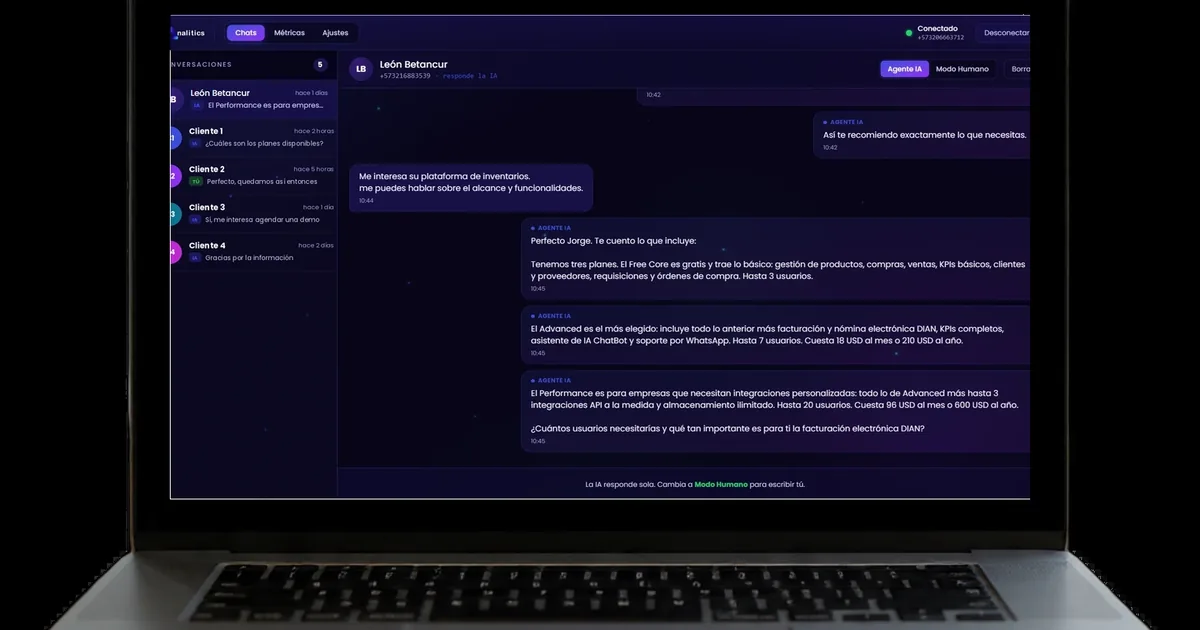
Our WhatsApp AI Agent talks through your business's real number, linked once with a QR code, and comes with the price, link and identity controls described above from day one. It has a web dashboard where you see conversations, qualified leads, the funnel and estimated AI cost, and from there you can change the model or the creativity of the replies without touching code. If your team uses Google Calendar, meetings are booked with their Meet link.
It is a product independent of our management platform: you can use one without the other. The setup and monthly figures are on the pricing page.
Want to see it replying live?
We will show you the agent handling a case similar to yours and look together at which questions it should resolve on its own and which it should pass to your team.
Book a demoFound this useful? Every week we share guides like this one on LinkedIn. Follow IANALITICS on LinkedIn →