
How a REST API integration is built, step by step
Key takeaways
- A REST API organizes a system's data into resources, each with its own web address, handled with HTTP methods (GET, POST, PATCH, DELETE), usually in JSON.
- Before any code, define the flow: what event triggers a send, what data travels, which system owns each field and at what volume.
- Authentication uses API keys, OAuth 2.0 or JWT tokens; credentials never live in the code and get only the permissions they need.
- A reliable integration maps fields carefully, searches before creating to avoid duplicates, retries only temporary errors and alerts someone when it fails.
In the article on integrations we covered what IANALITICS connects to and why that matters to a company. This is the other half: how it is done. It is written for whoever will be on the technical side of the project, and also for anyone who wants to understand what they are being quoted when someone talks about a custom integration.
Our integrations are built on REST APIs and written in Python. The steps below apply to almost any system: a CRM, an ERP, a Google spreadsheet or an invoicing system.
What a REST API is, concretely
A REST API organises a system's information into resources, and each resource has its own web address: customers, invoices, products. To work with them you use the same HTTP methods your browser uses, and the data almost always travels as JSON.
| Method | What it does | Example |
|---|---|---|
GET |
Read | GET /customers/4821 returns that customer |
POST |
Create | POST /customers creates a new one |
PUT or PATCH |
Update | PATCH /customers/4821 changes only the fields you send |
DELETE |
Delete | DELETE /customers/4821 |
Every response carries a code saying how it went. They are worth knowing, because the integration decides what to do based on the code it receives:
- 200 or 201: all good; with 201, the record was created.
- 400: the request is malformed. A field is missing or the format is not what was expected.
- 401 or 403: the credential is invalid or lacks permission for that operation.
- 404: what you are looking for does not exist.
- 429: you made too many requests in a row. You have to wait.
- 500 and up: the other system failed. It can be retried.
What a real request looks like
Creating a contact in a CRM, with sample data:
POST https://api.example-crm.com/v1/contacts
Authorization: Bearer eyJhbGciOiJIUzI1NiIs...
Content-Type: application/json

{
  "name": "Distribuidora Andina SAS",
  "tax_id": "900123456-7",
  "email": "purchasing@example.com",
  "city": "Medellín"
}
And what the CRM replies if everything went well:
HTTP/1.1 201 Created

{
  "id": "c_48213",
  "name": "Distribuidora Andina SAS",
  "created_at": "2026-09-13T10:42:05-05:00"
}
That is all that happens underneath. An integration is, at bottom, a program that assembles requests like that at the right moment and knows what to do with the response.
Step 1. Define the flow before writing code
Half the problems in an integration are solved or created here. You need to put in writing:
- Which event triggers the send. A confirmed sale, an issued invoice, a new customer.
- What data travels and in which direction. Does the CRM push customers to IANALITICS, does IANALITICS push sales to the CRM, or both?
- Which side is authoritative for each field. If a customer's email is changed in both systems on the same day, which one wins? Without that rule, the systems overwrite each other.
- How often and at what volume. Ten sales a day is not the same as ten thousand.
Step 2. Read the other API's documentation
This is where you find out how straightforward the integration will be. The first things to look for:
- How it authenticates.
- Usage limits: how many requests it allows per minute or per day.
- Pagination: long lists arrive in chunks, and you have to request them one by one.
- Whether it has a test environment (sandbox), so you are not experimenting on real data.
- Whether it offers webhooks, or whether you have to poll periodically to learn about changes.
If the system has no API, there are still routes, such as reading its database (SQL Server, MySQL) or exchanging files. They work, but they are more fragile, and that has to be said from the outset.
Step 3. Solve authentication
No serious API responds without knowing who is asking. The three most common approaches:
- API key. A fixed key sent with every request. It is simple, but if it leaks, whoever holds it can do everything that key allows until someone rotates it.
- OAuth 2.0. Someone at the company authorises the connection from the provider's screen, and the integration receives a token with limited permissions that expires and is renewed. It is what Google (Gmail, Sheets, Calendar), Microsoft (Power BI) and most CRMs use.
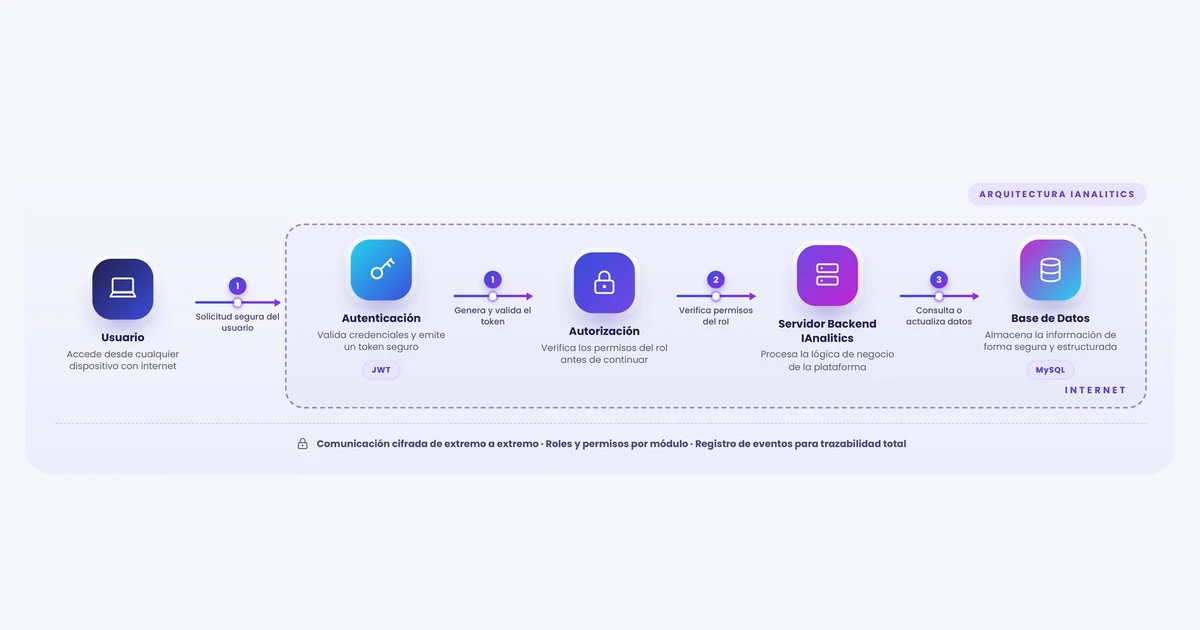
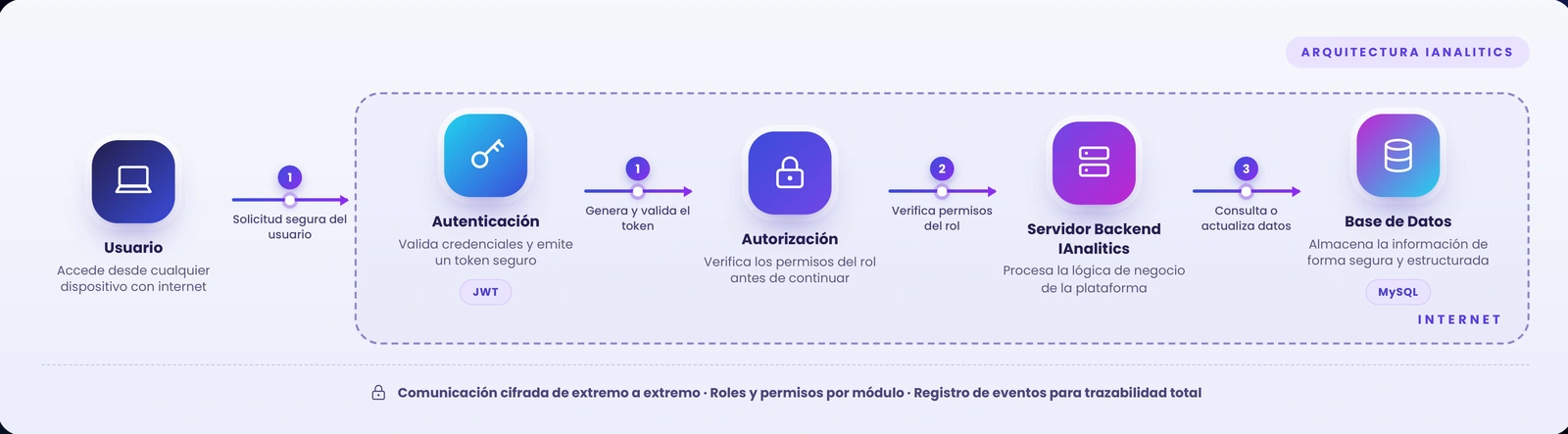
- JWT tokens. The system validates the credentials once and issues a signed token that accompanies subsequent requests. It is the scheme in the IANALITICS architecture shown in the diagram at the top.
Whatever the method, two rules are non-negotiable. Credentials go in environment variables or a secrets manager, never written into the code or committed to a repository. And you request only the permissions you need: if the integration only reads invoices, its credential should not be able to delete customers.
Step 4. Map the fields
Two systems almost never call the same thing by the same name. A typical mapping between an IANALITICS customer record and a CRM looks like this:
| IANALITICS | CRM | Watch out for |
|---|---|---|
| Customer name | name |
Legal name or trading name: you have to pick one |
| Tax ID | tax_id |
The ID with or without check digit, with or without a hyphen |
email |
If the CRM stores several, which one is for billing | |
| Phone | phone |
Country code +57 and digits only |
| Address | address |
Whether the city goes in the same field or separately |
The small details are what break things: dates in different formats, amounts with or without decimals, time zones. A sale recorded at 11 at night in Colombia already belongs to the next day in UTC, and if nobody accounts for that it shows up in the wrong day's report. That is why IANALITICS asks you to configure the company time zone during initial setup.
Step 5. Write the integration
A simplified Python example that sends a customer to a CRM. Before creating, it looks up whether the record already exists by tax ID; if it does, it updates it. That way, running the sync twice duplicates nothing.
import os
import time
import requests

CRM_URL = "https://api.example-crm.com/v1"
TOKEN = os.environ["CRM_TOKEN"]  # the credential is never written into the code


def call(method, path, **kwargs):
for attempt in range(4):
    r = requests.request(
        method,
        f"{CRM_URL}{path}",
        headers={"Authorization": f"Bearer {TOKEN}"},
        timeout=10,
        **kwargs,
    )
    if r.status_code == 429 or r.status_code >= 500:
        time.sleep(2 ** attempt)  # waits 1, 2, 4 and 8 seconds
        continue
    r.raise_for_status()  # a 400 or 401 is not retried: it is reported
    return r.json()
raise RuntimeError(f"{method} {path} failed after 4 attempts")


def sync_customer(customer):
data = {
    "name": customer["name"],
    "tax_id": customer["tax_id"],
    "email": customer["email"],
}
existing = call("GET", "/contacts", params={"tax_id": customer["tax_id"]})
if existing["data"]:
    contact_id = existing["data"][0]["id"]
    call("PATCH", f"/contacts/{contact_id}", json=data)
else:
    call("POST", "/contacts", json=data)
Three details in that code matter more than the rest:
- The timeout. Without
timeout, a slow API leaves the process hanging indefinitely. - Retry only what is worth retrying. A 429 or a 500 may resolve itself if you wait; retrying a 400 just repeats the same error four times.
- Look up before creating. That is what stops an internet outage mid-sync from leaving the CRM full of duplicate customers.
Step 6. Be ready for when it fails
It will fail at some point. The question is whether anyone finds out in time. The minimum:
- Log every call with its timestamp, data and response.
- Park whatever failed in a pending queue to resend, rather than losing it.
- Alert a person when errors pile up.
- Show the status where people work, not just in a log file nobody opens.
An example of that last point: in IANALITICS e-invoicing, each document is marked Issued or Error in the same invoice list. The error is visible there, and not on the day the customer calls to complain.
Step 7. Test and roll out gradually
First in the test environment and with awkward cases, not just the perfect customer: one with no email, a tax ID with a hyphen, a product with accents, a cancelled sale. With e-invoicing this is not even optional, because the DIAN requires you to pass a test set before it lets you issue.
Then go live with low volume or a single document type, compare against the manual process for a few days, and when the numbers match, expand.
Step 8. Keep it alive
An integration is not finished the day it ships. APIs publish new versions and announce when the old ones are switched off, tokens expire, and the business starts using a field that did not exist before. That maintenance has to be budgeted from the start. Be wary of an integration quote that does not mention it.
Polling or waiting for a notification
There are two ways to learn that something changed in the other system. Polling at intervals is simple and works with any API, but it spends requests even when there is nothing new and always arrives with some delay.
Webhooks reverse the direction: the other system notifies a web address of yours when something happens. They are immediate, but that address is exposed to the internet, so you have to verify the signature on every notification and be ready to receive the same notification twice.
How all this fits into IANALITICS
An integration enters IANALITICS the same way a user does, as the architecture diagram shows: it authenticates and receives a JWT token, the system verifies that its role has permission for that operation, and only then does the server query or update the MySQL database. Every step is recorded in the event log.
When what you need is analysis rather than data exchange — feeding Power BI dashboards, for instance — the integration publishes a REST endpoint with the dashboard data and Power BI reads it through its web connector. That is how we built the Migtra project. If the client prefers raw data, direct database access can also be granted, for reading or editing, under a confidentiality and data protection agreement; for analysis, read-only is the sensible choice.
The Performance plan includes up to three custom API integrations. What each plan includes is on the pricing page.
Have an integration in mind?
Tell us which systems you use and which piece of data you are tired of typing twice. We will read their API documentation and tell you how feasible it is.
Book a conversation Or create your free accountFound this useful? Every week we share guides like this one on LinkedIn. Follow IANALITICS on LinkedIn →